Troubleshooting Macintosh
Error Message
When you first run Juka on Macintosh, you might get the following error message:
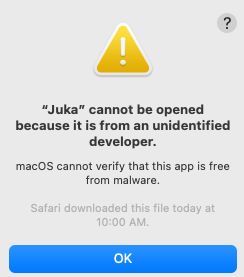
Cannot be opened because it is from an unidentified developer.
Workaround
To resolve this issue, follow these steps:
Double-click on the Juka app.
-
If it tries to open the application in the text editor, open up a terminal in the same folder and run ./Juka.
-
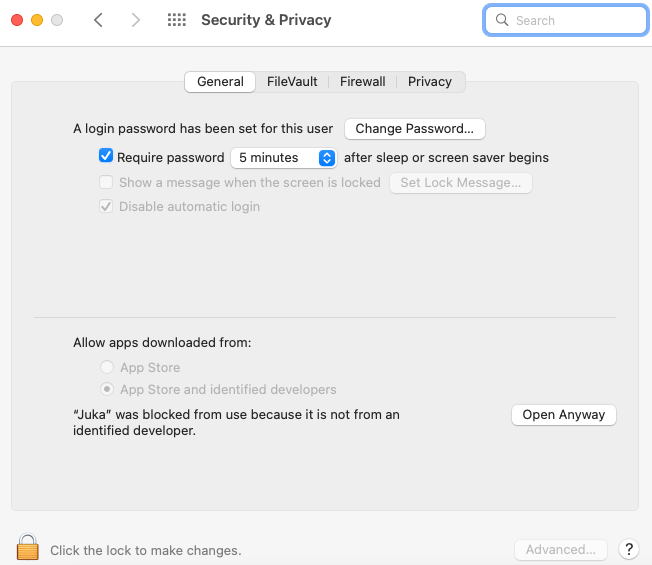
Click on the Apple icon in the top left corner of your screen and go to System Preferences.
-
Click on Security & Privacy.
-
Click on the General tab.
-
Click on the Open Anyway button next to the Juka app.
-
You should now be able to run Juka.
Alternative Workaround
You can use the following workaround:
Assuming that Juka is stored on your Desktop, open a Terminal window and navigate to the Juka directory. Run the following commands:
chmod +x ./Juka
sudo spctl --master-disable ./Juka
- This will disable Gatekeeper for the current session, allowing you to run Juka.
- Once you are done using Juka, run the following command to re-enable Gatekeeper:
sudo spctl --master-enable
This will re-enable the "gatekeeper".
Notes
- Juka is currently not signed by Apple, so you may encounter this error message when you first run it.
- We are working on getting Juka signed by Apple, so this error message should not be an issue in the future.
- If you have any further questions, please feel free to contact us.